 ShadowMC
Five area shapes
Cuboid, polygon with as many vertices as you like, sphere, cylinder - elliptical too - and the whole world: not just two opposite corners.

Free
Protect a place in three steps, with the rules written in plain words.
Free Stable Protection and security
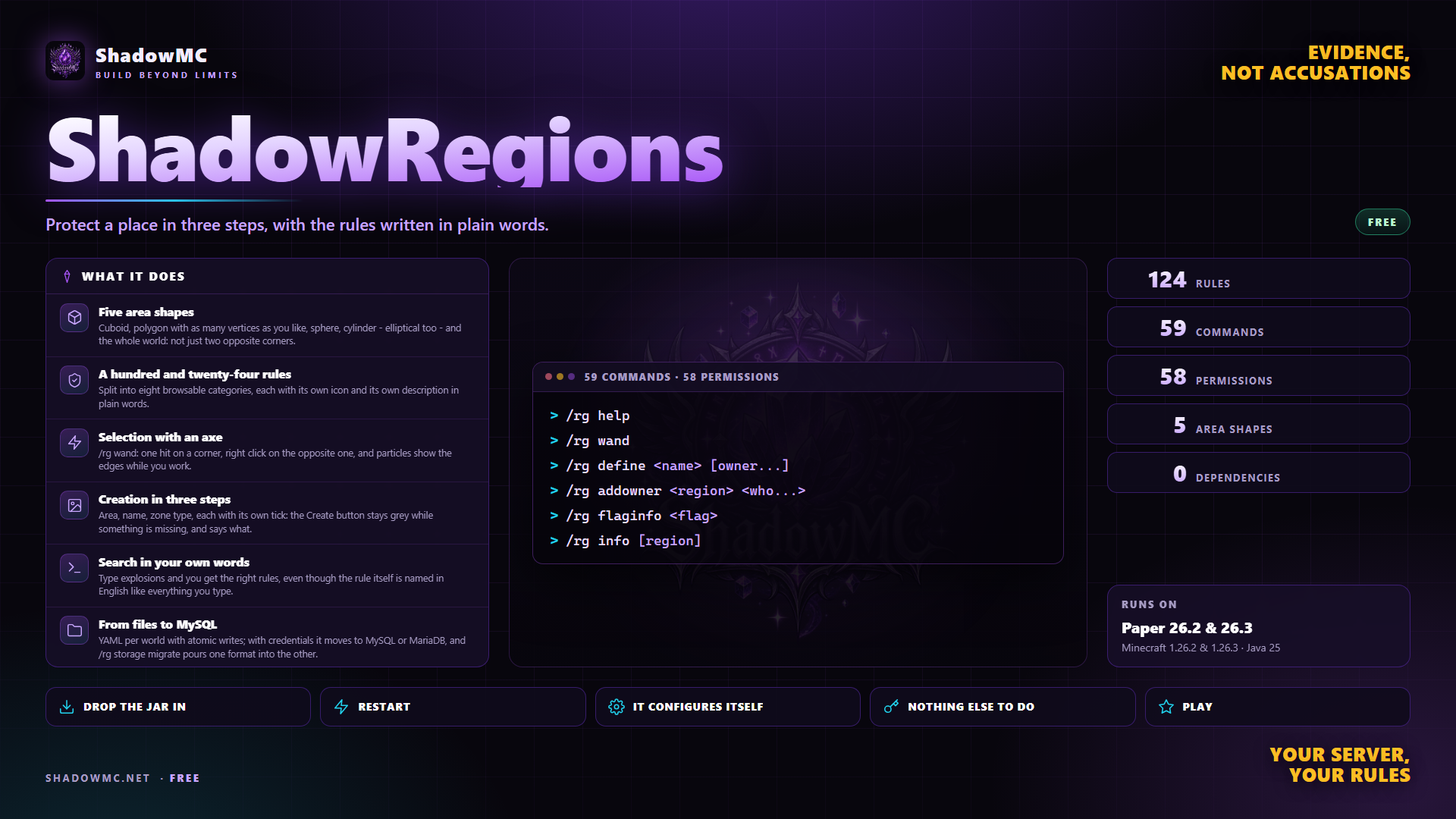
Cuboid, polygon with as many vertices as you like, sphere, cylinder - elliptical too - and the whole world: not just two opposite corners.
Split into eight browsable categories, each with its own icon and its own description in plain words.
/rg wand: one hit on a corner, right click on the opposite one, and particles show the edges while you work.
Area, name, zone type, each with its own tick: the Create button stays grey while something is missing, and says what.
Type explosions and you get the right rules, even though the rule itself is named in English like everything you type.
YAML per world with atomic writes; with credentials it moves to MySQL or MariaDB, and /rg storage migrate pours one format into the other.
| Command | Description | Aliases | Permission |
|---|---|---|---|
| /rg | ShadowRegions - region protection | /region /regions /shadowregions /sr | shadowregions.command |
| Command | What it does | Permission |
|---|---|---|
| /rg help | The list of commands you are allowed to use. | — |
| /rg gui [region] | Opens the main panel. | shadowregions.gui |
| /rg edit <region> | The area editor, drawn in particles. | shadowregions.gui |
| /rg flags [region] | The rules menu. | shadowregions.gui |
| Command | What it does | Permission |
|---|---|---|
| /rg wand | Hands you the selection axe. | shadowregions.wand |
| /rg pos1 [x y z] | First corner. | shadowregions.wand |
| /rg pos2 [x y z] | Second corner. | shadowregions.wand |
| /rg sel [clear|gui|mode|poly|sphere|cylinder|we] | The current selection, and changing its shape. | shadowregions.wand |
| /rg size | Measurements and volume. | shadowregions.wand |
| /rg expand <n|vert> [dir] | Widens the selection. | shadowregions.wand |
| /rg contract <n> [dir] | Narrows the selection. | shadowregions.wand |
| /rg shift <n> [dir] | Moves the selection. | shadowregions.wand |
| /rg select <region> | Loads the area of a region that already exists. | shadowregions.wand |
| /rg undo | Undoes the last change to the area. | — |
| Command | What it does | Permission |
|---|---|---|
| /rg define <name> [owner...] | Creates a region; with -g, the global one. | shadowregions.define |
| /rg claim <name> | Creates a region within your own limits. | shadowregions.claim |
| /rg redefine <region> | Replaces the area with the selection. | shadowregions.redefine.* |
| /rg rename <region> <new-name> | Renames it. | shadowregions.rename.* |
| /rg remove <region> [-f] | Deletes it. | shadowregions.remove.* |
| /rg copy <from> <to> | Copies rules and people. | shadowregions.copy |
| /rg setpriority <region> <n> | Who wins when two regions overlap. | shadowregions.priority.* |
| /rg setparent <region> [parent] | Which region this one sits inside. | shadowregions.parent.* |
| Command | What it does | Permission |
|---|---|---|
| /rg addowner <region> <who...> | Adds owners, g:group included. | shadowregions.owner.* |
| /rg removeowner <region> <who...> | Removes owners. | shadowregions.owner.* |
| /rg addmember <region> <who...> | Adds members. | shadowregions.member.* |
| /rg removemember <region> <who...> | Removes members. | shadowregions.member.* |
| Command | What it does | Permission |
|---|---|---|
| /rg flag <region> <flag> [value] [-g group] | Sets a rule or takes it away. | shadowregions.flag.* |
| /rg flaginfo <flag> | The card of one rule: type, factory value, permission. | shadowregions.info |
| /rg preset <region> <preset> | Applies a ready-made preset. | shadowregions.preset |
| /rg presets | The list of presets. | shadowregions.preset |
| Command | What it does | Permission |
|---|---|---|
| /rg info [region] | The region's full card. | shadowregions.info |
| /rg list [world] [page] | The list of regions. | shadowregions.info |
| /rg here | Which regions you are standing in right now. | shadowregions.info |
| /rg near [radius] | Regions nearby. | shadowregions.info |
| /rg count [player] | How many regions they own. | shadowregions.info |
| /rg stats [region] | Usage statistics. | shadowregions.info |
| /rg overlap [world] | Finds the overlaps. | shadowregions.status |
| /rg tp <region> | Teleport. | shadowregions.teleport.own |
| /rg show [region] | Switches the particle borders on. | shadowregions.show |
| Command | What it does | Permission |
|---|---|---|
| /rg buy [region] | Buys a region that is for sale. | shadowregions.claim |
| /rg rent [region] | Rents one, or renews the rent. | shadowregions.claim |
| /rg sell <region> <price> | Puts it up for sale. | shadowregions.flag.* |
| /rg unsell <region> | Takes it off the market. | shadowregions.flag.* |
| /rg setrent <region> <price> <period> | Puts it up for rent. | shadowregions.flag.* |
| /rg lease <region> <duration|never> | The region's expiry. | shadowregions.admin |
| Command | What it does | Permission |
|---|---|---|
| /rg condition <region> <add|list|remove|clear> | Rules that switch themselves on. | shadowregions.flag.* |
| /rg inspect [region] | The latest changes to the blocks. | shadowregions.rollback |
| /rg rollback <region> <duration> [player] | Puts the blocks back. | shadowregions.rollback |
| /rg history <region> | The history of changes to the region. | shadowregions.history |
| /rg bypass [player] | Switches the master key on and off. | shadowregions.bypass.toggle |
| Command | What it does | Permission |
|---|---|---|
| /c | The claims help, when claims.yml says enabled: true. Aliases /ucl, /claims, /ultimateclaims. | — |
| /c claim | Claims the chunk you stand in: the first one creates the claim, the next ones extend it. /claim works too. | shadowregions.claims.claim |
| /c unclaim | Takes the chunk you stand in off your claim, except the power cell's one. /unclaim works too. | shadowregions.claims.unclaim |
| /c show | Switches the borders of the claims around you on and off. /claimshow works too. | shadowregions.claims.show |
| /c recipe | The recipe of the power cell, which keeps the claim alive. | shadowregions.claims.recipe |
| /c name <name> | Names your claim, while you stand inside it. | shadowregions.claims.name |
| /c sethome | Sets the home of your claim where you stand. | shadowregions.claims.sethome |
| /c home <claim> | Takes you to the home of a claim you belong to. | shadowregions.claims.home |
| /c lock | Locks your claim to visitors, or opens it again. | shadowregions.claims.lock |
| /c invite <player> | Invites an online player into your claim. | shadowregions.claims.invite |
| /c accept | Accepts the latest invitation you received. /claimaccept works too. | shadowregions.claims.accept |
| /c addmember <player> | Adds a member without an invitation. | shadowregions.claims.addmember |
| /c kick <member> | Takes a member off your claim. | shadowregions.claims.kick |
| /c ban <member> | Bans a player from your claim and sends them out. | shadowregions.claims.ban |
| /c unban <member> | Lifts the ban. | shadowregions.claims.unban |
| /c leave <claim> | Leaves a claim you are a member of. | shadowregions.claims.leave |
| /c dissolve | Dissolves your claim. | shadowregions.claims.dissolve |
| Command | What it does | Permission |
|---|---|---|
| /rg reload | Reloads configuration, languages and menus. | shadowregions.reload |
| /rg save | Writes to disk or database right now. | shadowregions.save |
| /rg status | Diagnostics: storage, cache, timings, integrations. | shadowregions.status |
| /rg storage <status|migrate> | The state of the storage, and migrating it. | shadowregions.storage |
| /rg import worldguard [world] [--dry-run] | Import, from GriefPrevention and RedProtect as well. | shadowregions.import |
| /rg debug <flags|index> | The internals of the index and of the rules. | shadowregions.status |
| Command | What it does | Permission |
|---|---|---|
| /rg import worldguard [world] | WorldGuard. | — |
| /rg import griefprevention | GriefPrevention. | — |
| /rg import redprotect | RedProtect. | — |
| /c admin import <file.sql> | UltimateClaims, from a dump of its database placed in plugins/ShadowRegions. | shadowregions.claims.admin |
| Command | What it does | Permission |
|---|---|---|
| /c admin removeclaim | Removes the claim you are standing in. | shadowregions.claims.admin.removeclaim |
| /c admin transferownership <player> | Hands the claim you are standing in to an online player who does not own one yet. | shadowregions.claims.admin.transferownership |
| /c admin name <name> | Renames the claim you are standing in, with no length limit. | shadowregions.claims.admin.name |
| /c admin lock | Locks or unlocks the claim you are standing in. | shadowregions.claims.admin.lock |
| /c setspawn | Where whoever is sent out of a locked claim, or banned, ends up. | shadowregions.claims.admin |
| /c settings | Says where claims.yml is: change it there, then restart. | shadowregions.claims.admin |
| /c reload | Reloads the language files. | shadowregions.claims.admin |
| Node | What it grants | By default |
|---|---|---|
| shadowregions.command | Use /rg | Everyone |
| shadowregions.info | Look at regions: info, here, list, near, count, stats, flaginfo | Everyone |
| shadowregions.claim | Claim a region within the configured limits, and buy or rent one | Everyone |
| shadowregions.gui | Open the graphical panels | Operators |
| shadowregions.wand | Receive and use the selection wand | Operators |
| shadowregions.show | Toggle the particle outline | Operators |
| shadowregions.list.others | See regions owned by other players | Operators |
| shadowregions.teleport.own | /rg tp to your own regions | Operators |
| shadowregions.teleport.all | /rg tp to any region | Operators |
| shadowregions.define | Create regions, including the global one with -g | Operators |
| shadowregions.copy | Copy flags and members onto another region | Operators |
| shadowregions.preset | Apply flag presets | Operators |
| shadowregions.redefine.own | May change the shape of regions you own | Operators |
| shadowregions.redefine.member | May change the shape of regions you are a member of | Operators |
| shadowregions.redefine.all | May change the shape of any region | Operators |
| shadowregions.rename.own | May rename regions you own | Operators |
| shadowregions.rename.member | May rename regions you are a member of | Operators |
| shadowregions.rename.all | May rename any region | Operators |
| shadowregions.remove.own | May delete regions you own | Operators |
| shadowregions.remove.member | May delete regions you are a member of | Operators |
| shadowregions.remove.all | May delete any region | Operators |
| shadowregions.priority.own | May change the priority of regions you own | Operators |
| shadowregions.priority.member | May change the priority of regions you are a member of | Operators |
| shadowregions.priority.all | May change the priority of any region | Operators |
| shadowregions.parent.own | May change the parent of regions you own | Operators |
| shadowregions.parent.member | May change the parent of regions you are a member of | Operators |
| shadowregions.parent.all | May change the parent of any region | Operators |
| shadowregions.flag.own | May change the flags of regions you own | Operators |
| shadowregions.flag.member | May change the flags of regions you are a member of | Operators |
| shadowregions.owner.own | May add and remove owners on regions you own | Operators |
| shadowregions.owner.member | May add and remove owners on regions you are a member of | Operators |
| shadowregions.owner.all | May add and remove owners on any region | Operators |
| shadowregions.member.own | May add and remove members on regions you own | Operators |
| shadowregions.member.member | May add and remove members on regions you are a member of | Operators |
| shadowregions.member.all | May add and remove members on any region | Operators |
| shadowregions.flag.all | Change every flag, on any region | Operators |
| shadowregions.flag | Root of the per flag nodes: shadowregions.flag.<flag name> | Operators |
| shadowregions.flag.enter-command | Set the commands run when somebody enters | Operators |
| shadowregions.flag.exit-command | Set the commands run when somebody leaves | Operators |
| shadowregions.flag.game-mode | Force a game mode inside the region | Operators |
| shadowregions.flag.teleport | Set where /rg tp lands | Operators |
| shadowregions.flag.spawn | Set where somebody who died there respawns | Operators |
| shadowregions.flag.teleport-on-entry | Set where somebody entering the region is sent | Operators |
| shadowregions.flag.teleport-on-exit | Set where somebody leaving the region is sent | Operators |
| shadowregions.flag.join-location | Set where somebody logging in inside the region is sent | Operators |
| shadowregions.flag.chunk-unload | Keep the chunks of a region loaded (chunk-unload deny) | Operators |
| shadowregions.bypass | Ignore every region protection, everywhere | Operators |
| shadowregions.bypass.toggle | /rg bypass, to turn the pass key on and off | Operators |
| shadowregions.notify | Receive region enter/exit and blacklist notifications | Operators |
| shadowregions.blacklist.bypass | Ignore the blacklist | Operators |
| shadowregions.rollback | Inspect and roll back block changes inside regions | Operators |
| shadowregions.sign.create | Create sale and rent signs | Operators |
| shadowregions.limits.bypass | No limit on the number or the volume of regions | Operators |
| shadowregions.limits.regions | Root of the numeric nodes: shadowregions.limits.regions.<n> | Nobody |
| shadowregions.limits.volume | Root of the numeric nodes: shadowregions.limits.volume.<n> | Nobody |
| shadowregions.admin | Every administrative command, and every action on every region | Operators |
| shadowregions.reload | /rg reload | Operators |
| shadowregions.save | /rg save | Operators |
| shadowregions.status | /rg status, /rg debug and /rg overlap | Operators |
| shadowregions.storage | /rg storage | Operators |
| shadowregions.import | /rg import | Operators |
| shadowregions.history | /rg history | Operators |
| shadowregions.claims.claim | /c claim and /claim: claim the chunk you stand in | Operators |
| shadowregions.claims.unclaim | /c unclaim: take a chunk off your claim | Operators |
| shadowregions.claims.show | /c show: see the claims around you | Operators |
| shadowregions.claims.invite | /c invite: invite a player into your claim | Operators |
| shadowregions.claims.accept | /c accept: accept the latest invitation | Operators |
| shadowregions.claims.addmember | /c addmember: add a member without an invitation | Operators |
| shadowregions.claims.kick | /c kick: kick a member out of your claim | Operators |
| shadowregions.claims.ban | /c ban: ban a player from your claim | Operators |
| shadowregions.claims.unban | /c unban: unban a player | Operators |
| shadowregions.claims.dissolve | /c dissolve: dissolve your claim | Operators |
| shadowregions.claims.leave | /c leave: leave a claim you are a member of | Operators |
| shadowregions.claims.lock | /c lock: lock or unlock your claim | Operators |
| shadowregions.claims.home | /c home: go to the home of a claim | Operators |
| shadowregions.claims.sethome | /c sethome: set the home of your claim | Operators |
| shadowregions.claims.recipe | /c recipe: see the recipe of the power cell | Operators |
| shadowregions.claims.name | /c name: name your claim | Operators |
| shadowregions.claims.home.auto | The home is set on the power cell when it is created | Operators |
| shadowregions.claims.fly | Fly inside claims where the owner turned flight on | Operators |
| shadowregions.claims.powercell.view | Open the power cell of any claim | Operators |
| shadowregions.claims.powercell.edit | Put valuables into the power cell of any claim | Operators |
| shadowregions.claims.toggle.hostilemobspawning | Switch hostile mob spawning of your claim | Operators |
| shadowregions.claims.toggle.firespread | Switch fire spread of your claim | Operators |
| shadowregions.claims.toggle.pvp | Switch PvP of your claim | Operators |
| shadowregions.claims.toggle.mobgriefing | Switch mob griefing of your claim | Operators |
| shadowregions.claims.toggle.leafdecay | Switch leaf decay of your claim | Operators |
| shadowregions.claims.toggle.tnt | Switch TNT damage of your claim | Operators |
| shadowregions.claims.toggle.fly | Switch flight in your claim | Operators |
| shadowregions.claims.bypass.perms | Build, break and use everything inside any claim | Operators |
| shadowregions.claims.bypass.lock | Walk into locked claims | Operators |
| shadowregions.claims.bypass.ban | Walk into claims you are banned from | Operators |
| shadowregions.claims.bypass.home | /c home to any claim | Operators |
| shadowregions.claims.bypass.fly | Fly in every claim | Operators |
| shadowregions.claims.admin | /c settings, /c reload, /c setspawn and /c admin import | Operators |
| shadowregions.claims.admin.removeclaim | /c admin removeclaim, and break any power cell | Operators |
| shadowregions.claims.admin.transferownership | /c admin transferownership | Operators |
| shadowregions.claims.admin.name | /c admin name | Operators |
| shadowregions.claims.admin.lock | /c admin lock | Operators |
| shadowregions.claims.admin.invisible | Not counted as a visitor, never kept out by a lock or a ban | Operators |
| shadowregions.claims.admin.nolog | Opening a power cell is not written in its audit log | Operators |
| shadowregions.claims.maxclaims | Root of the numeric nodes: shadowregions.claims.maxclaims.<n> chunks | Nobody |
There are no screenshots yet. When there are they show up here, and in the meantime saying so beats filling the space.
Five area shapes, 124 rules split into eight browsable categories, selection with an axe and particles showing the edges while you work. From YAML per world to MySQL with one line.
Proteggere lo spawn e' la prima cosa che si fa su un server, ed e' anche la prima in cui ci si perde.
ShadowRegions covers what you do today with WorldGuard — in one jar, with no dependencies to install first.
plugins folder of your Paper server.None of these has to be installed, except the ones marked required: when it is there, ShadowRegions uses it; when it is missing, it works all the same.